Video API: The Complete Guide for Business Use Cases

A video API lets you add live video calls to your own website or app instead of sending customers to a separate meeting tool. You create rooms through REST calls, join them from web and mobile SDKs, and add recording, screen share, streaming and AI on top. Businesses use it where the video call is part of a process: identity checks, onboarding, support, consultations, interviews and live selling.
Key takeaways
- A video API puts live video inside your own product and workflow, not in a separate meeting app.
- Most video APIs run on WebRTC, so calls open in the browser without an app install.
- For business use, recording, security, network resilience and integration matter more than the video itself.
- The strongest use cases are processes with a decision at the end: verify, onboard, fix, sell, treat.
- Regulated teams should check early whether the platform can run in-region or on-premise.
Most people think of video calls as meetings. Someone sends a link, everyone joins a meeting app, and the call is the event. In business processes, video works differently. The call is one step in a longer flow: a customer proves who they are, a technician fixes a machine, a shopper decides to buy. The call has to happen inside your app, follow your rules and leave a record in your systems.
That is the job of a video API. This guide explains what a video API is, how it works, which features matter for business use, where it pays off, and what to check before you choose one.
What is a video API?
A video API (also called a video calling API) is a set of programming interfaces that lets developers embed video calls in their own web and mobile apps. Instead of building media servers, signaling and network handling from scratch, you call the API to create a room, give users a token to join, and control the session from your code.
The difference from a meeting tool is control. With a meeting tool, the vendor decides how the call looks, where it is stored and what happens after it. With a video API, you decide. The call carries your brand, runs inside your customer journey, and sends its events and recordings to your systems.
How does a video API work?
Your server asks the API for a room and a join token, your app joins the room through an SDK, and media flows between participants through the platform's media servers. Events such as "participant joined" or "recording ready" come back to your server so your workflow can move on.
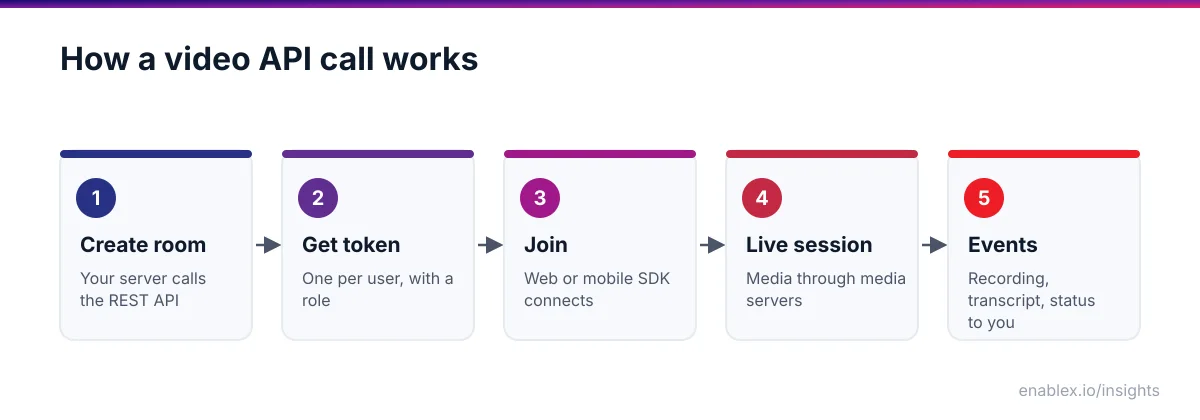
What the figure shows: How a video API call works: 1) Create room: your server calls the REST API; 2) Get token: one per user, with a role; 3) Join: web or mobile SDK connects; 4) Live session: media through media servers; 5) Events: recording, transcript, status to you.
Most modern video APIs are WebRTC video APIs, built on WebRTC, the open standard that browsers use for real-time audio and video. WebRTC is why a customer can join from a link in Chrome or Safari without installing anything. It also brings encryption by default: media is protected in transit with DTLS-SRTP.
Behind the scenes, a media server (usually an SFU, or selective forwarding unit) receives each participant's stream and forwards it to the others. This lets a room scale past two people without every device sending video to every other device. Adaptive bitrate lowers quality when a network gets weak, so the call keeps going instead of freezing.
Which video API features matter for business use?
For business processes, the video itself is the easy part. What decides success is everything around it: recording you can audit, security you can defend, quality on weak networks, and events your systems can act on.
Feature | Why it matters | Where it is used most |
|---|---|---|
Browser join, no app | Customers join from a link sent by SMS or WhatsApp | KYC, onboarding, support, sales |
Server-side recording | Individual and composite recordings, delivered to your storage | KYC audit trail, claims, consultations |
Screen share and annotation | An expert can point at what the customer sees | Field service, tech support, demos |
Roles and moderation | Agent and customer get different rights; waiting rooms | Banking, telehealth, interviews |
Broadcast and HLS | Thousands watch while a few talk | Live shopping, town halls, classes |
AI on the session | Transcripts, summaries, liveness, face match | KYC, interviews, quality review |
Deployment choice | Cloud, in-region, hybrid or on-premise | Regulated banks, insurers, government |
Where does a video API pay off?
Video pays off when it replaces a trip, a delay or a risk. The best use cases share one trait: there is a decision or a result at the end of the call, and the call shortens the path to it.
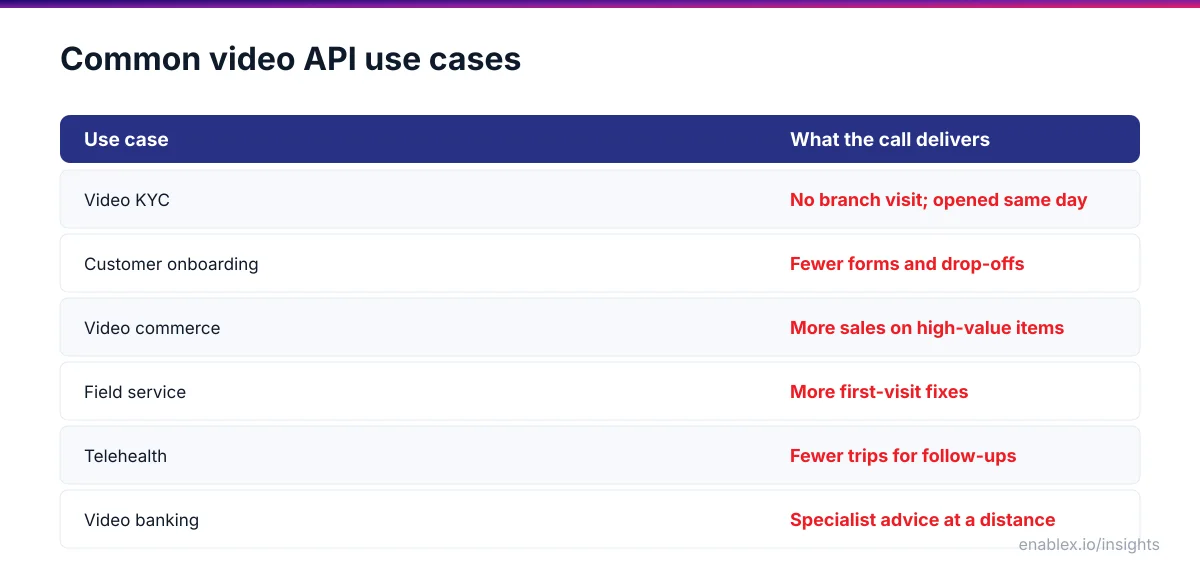
What the figure shows: Common video API use cases: Video KYC: no branch visit; opened same day; Customer onboarding: fewer forms and drop-offs; Video commerce: more sales on high-value items; Field service: more first-visit fixes; Telehealth: fewer trips for follow-ups; Video banking: specialist advice at a distance.
Each of these has its own guide in this series. Video KYC and video banking are covered from the regulator's angle, field service and video commerce from the operations angle, and telehealth from the patient's. For account opening flows, see digital customer onboarding, and for teams that must keep video inside their own network, see on-premise video calling.
One example: a lending company added video verification to its onboarding app on the EnableX Video API. The first version went live in a few weeks, with recordings sent to its own storage. Customers now finish identity checks in one session instead of visiting a branch.
Cloud, in-region or on-premise: where should your video API run?
Most teams start in the vendor cloud, which is the fastest way to go live. Regulated teams often need more control: media routed and stored in their own country, or the whole video stack running in their own data center.
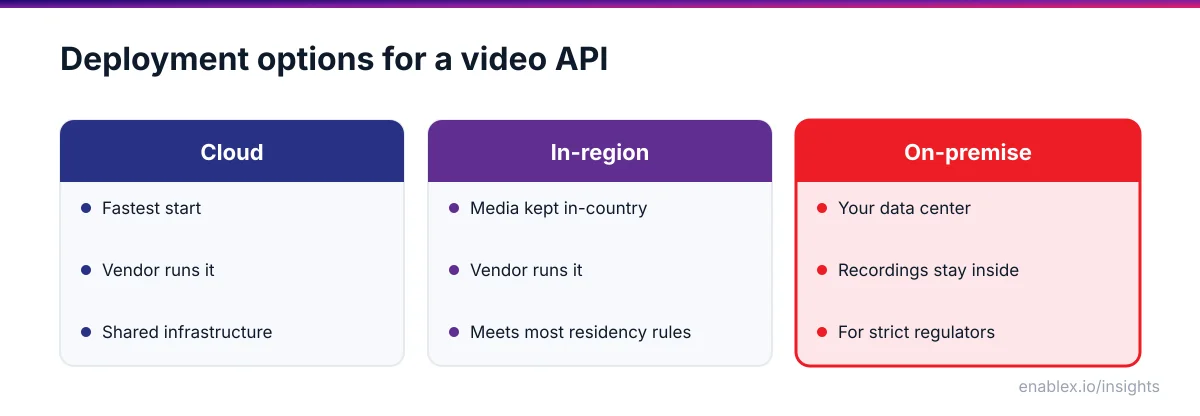
What the figure shows: Deployment options for a video API: Cloud (fastest start, vendor runs it, shared infrastructure); In-region (media kept in-country, vendor runs it, meets most residency rules); On-premise (your data center, recordings stay inside, for strict regulators).
If you work in banking, insurance, healthcare or government, ask about this on the first call with any vendor, not the last. Moving from cloud to on-premise later is possible only if the platform was built for it. We cover this in detail in On-Premise Video Calling.
How do you choose a video API?
- Test on real networks. Try a call on a 4G phone in a weak-signal area, not just office Wi-Fi.
- Check recording and storage. Where do recordings go, in what format, and can you watermark them and send them to your own storage?
- Check security. Encryption in transit and at rest, access control, audit logs, and where media is routed.
- Check the video call SDKs you need. Web, iOS, Android, React Native, and a low-code embed if your team is small.
- Ask about deployment. Cloud regions available, and whether on-premise is real and running in production.
- Ask what else runs on the same platform. OTP, SMS, WhatsApp and voice in the same flow save a lot of integration work.
How the EnableX Video API helps
The EnableX Video API adds WebRTC video to web and mobile apps through REST endpoints and SDKs for JavaScript, iOS, Android and React Native. It supports 1:1, group and broadcast rooms, screen share, server-side recording, HLS streaming and AI analysis of sessions. It runs in the cloud, in-region or on-premise, and more than 200K video calls a month run on it.
Because it sits on the same platform as SMS, WhatsApp, RCS and voice, the invite link, the OTP and the follow-up message all come from one place. If this kind of platform is new to you, What is CPaaS? explains how the pieces fit. EnableX handles 10M+ conversations a month across these channels for customers in 20+ countries.
The most common failure is underestimating everything around the call. Teams get a 1:1 call working quickly, then spend months on weak networks, recording, scaling past a few users and mobile quirks. A video API gives you these parts already built and tested, so your team works on the workflow.
Ready to try it? Create a free account, get your API keys, and start a test room in a few minutes. New accounts get trial credit to use across all EnableX services.
Frequently asked questions
What is a video API?
A video API is a set of programming interfaces that lets developers add live video calls to their own web and mobile apps, with control over rooms, users, recording and events.
What is the difference between a video API and a video SDK?
The API is the server-side interface you call to create and manage rooms. The SDK is the client library your web or mobile app uses to join rooms and send and receive media. Most platforms provide both.
Do customers need to install an app for a video API call?
Not with a WebRTC-based video API. Customers can join from a link in a modern mobile or desktop browser.
Is a video API secure enough for banking and healthcare?
It can be. Look for encryption in transit and at rest, role-based access, audit trails, in-region media routing and, where rules require it, on-premise deployment.
How long does it take to add video to an app?
A basic room can run in a day. A full business flow with recording, roles and system integration usually takes a few weeks.
Head - Engineering & AI, EnableX
Subrat Thayal is a founding member of EnableX and leads its engineering and AI. He has built the EnableX platform since the company started in 2017. He has worked alongside Pankaj Gupta for more than 20 years, and for the last few years has led the work to build AI into EnableX voice, messaging and video products.
Connect on LinkedIn →