Remote Video Assistance for Field Service: Fix It on the First Visit

Remote video assistance lets a technician or a customer start a live video call with an expert who can see what they see, point at parts on screen and guide the fix. Field service teams use it to solve problems on the first visit, avoid sending a second expert, and sometimes avoid the visit altogether by guiding the customer directly.
Key takeaways
- Repeat visits are one of the biggest hidden costs in field service.
- Live video brings the expert to the job without travel.
- Annotation, camera switching, screenshots and recording matter more than video quality alone.
- It works best inside the field service app, tied to the job record.
- Track first-time fix rate, repeat visits and time to resolve.
A field technician arrives at a site, opens the panel and finds something they have not seen before. The expert who knows the answer is two hours away. The options are a long phone call trying to describe the problem, or a second visit next week. Either way, the customer waits and the job costs more.
Remote video assistance gives a third option: show the expert the problem, right now. This guide explains how it works, where it pays off and how to roll it out.
What is remote video assistance?
Remote video assistance is a live video call between someone at a site (a technician or a customer) and a remote expert, built into the tools the field team already uses. The expert sees through the caller's phone camera, marks up the live view and guides the fix step by step.
Where does it pay off in field service?
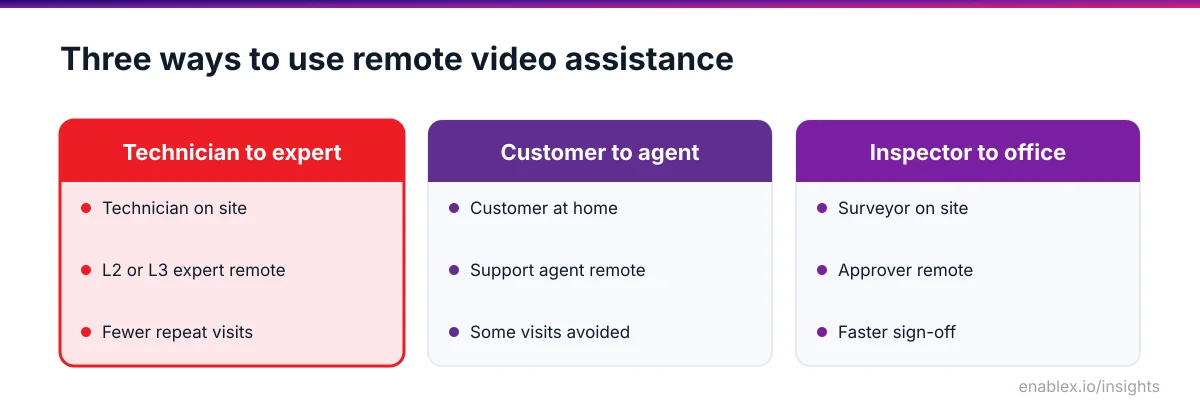
What the figure shows: Three ways to use remote video assistance: Technician to expert (technician on site, L2 or L3 expert remote, fewer repeat visits); Customer to agent (customer at home, support agent remote, some visits avoided); Inspector to office (surveyor on site, approver remote, faster sign-off).
- Escalations on site. A junior technician gets L2 or L3 help in minutes instead of booking a second visit.
- Guided self-service. A support agent walks a customer through a reset or a simple repair on video, so no one travels.
- Pre-visit triage. A short video call before dispatch shows which part and which skill the job needs.
- Inspections and surveys. Insurers, utilities and property teams inspect remotely and record the evidence.
- Installation sign-off. The customer and the installer confirm the finished job on video, with a recording for the file.
Which features matter most?
Feature | Why it matters on the job |
|---|---|
Annotation on the live view | The expert circles the exact valve or connector, instead of describing it |
Rear camera and switching | The technician shows the equipment, then turns to talk |
Works on weak networks | Sites are often basements, plant rooms or rural areas; adaptive bitrate keeps the call alive |
Screenshots and recording | Evidence for the job record, warranty claims and training |
Screen share | The expert shares a manual, wiring diagram or dashboard |
Inside the job app | One tap from the job card; the call is logged against the job |
Masked numbers for voice | Customer and technician talk without sharing personal numbers |
How does a remote-assisted job flow?
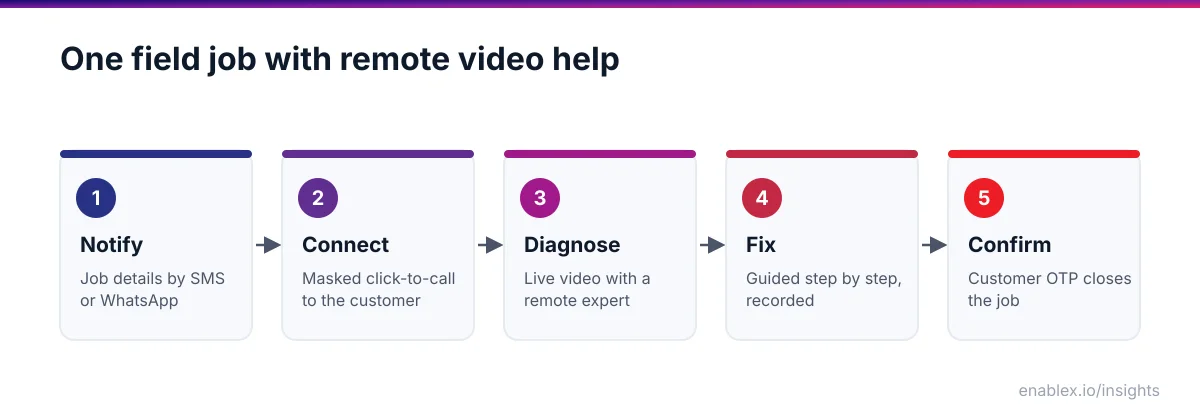
What the figure shows: One field job with remote video help: 1) Notify: job details by SMS or WhatsApp; 2) Connect: masked click-to-call to the customer; 3) Diagnose: live video with a remote expert; 4) Fix: guided step by step, recorded; 5) Confirm: customer OTP closes the job.
How do you roll it out?
- Pick one job type with many repeat visits, such as a common appliance fault or a network installation.
- Set up an expert desk with clear hours and a target answer time.
- Put the video button in the job app, not in a separate tool, so technicians actually use it.
- Train for two minutes, not two hours. Show how to start a call, switch cameras and hold the phone steady.
- Review recordings weekly to spot recurring faults and turn them into training or self-help guides.
- Expand to customer-guided fixes once the expert desk runs smoothly.
What should you measure?
- First-time fix rate: jobs closed on the first visit.
- Repeat visits avoided: escalations solved on video instead of a second trip.
- Visits avoided: customer issues solved by guided video with no dispatch.
- Time to resolve: from fault report to job closed.
- Expert answer time: how long a technician waits for help.
How does video compare with phone support for field jobs?
Phone call | Live video assistance | |
|---|---|---|
How the expert understands the fault | From the technician's description | By seeing the equipment |
Guidance | Spoken instructions | Annotations on the live view |
Evidence | Call notes | Screenshots and recording on the job |
Works for customer self-fix | Rarely | Often, for simple faults |
Training value | Low | Recordings become training material |
The phone is still useful for quick questions. Video earns its place when the problem is easier to show than to describe, which in field service is most of the time.
What about privacy on site?
Calls often happen in customers' homes and businesses. Tell the customer before a call is recorded, keep recordings tied to the job and stored securely, and limit who can view them. Masked phone numbers keep personal numbers private on both sides.
How EnableX helps
The EnableX Video API embeds HD video with annotation, screen share, camera switching, screenshots and recording into any field service, CRM or support app. On the same platform, technicians get job details by SMS or WhatsApp, talk to customers through masked click-to-call, and close jobs with an OTP. See the full flow in Field Services.
Want fewer repeat visits? Start with one job type and one expert desk, and measure the change in a month.
Frequently asked questions
What is remote video assistance?
A live video call between someone on site and a remote expert, who sees through the caller's camera, marks up the view and guides the fix.
How does remote video assistance reduce costs?
It lets experts solve problems without travel, so fewer jobs need a second visit and some visits are avoided completely.
Does remote video assistance work on poor networks?
A good platform adapts video quality to the network, so calls continue on weak mobile signals, at lower resolution if needed.
Can customers use remote video assistance?
Yes. Support agents can guide customers through simple fixes on video from a link, with no app install.
What is the most important metric?
First-time fix rate, alongside repeat visits avoided and time to resolve.
Founder and CEO, EnableX
Pankaj Gupta has spent 25+ years building IT and telecom businesses across Asia-Pacific and global markets. EnableX is his third company; the first two were built from zero and acquired by global companies. He also invests in B2B startups and mentors founders across the region.
Connect on LinkedIn →