Video KYC Explained: How Remote Identity Checks Work, Step by Step

Video KYC is a way to verify a customer's identity on a live video call instead of a branch visit. The customer joins from a link in their phone browser, shows an ID document, and an authorized officer checks it while software runs liveness detection, document reading and face matching. The session is recorded, time-stamped and geo-tagged for audit. A standard check takes three to five minutes.
Key takeaways
- Video KYC replaces a branch visit with a recorded live video call with an authorized officer.
- Software checks liveness, reads the ID and matches the face while the officer leads the call.
- Regulators set the rules, such as RBI's V-CIP in India; recordings and audit trails are central.
- Browser join, weak-network performance and clean handover to core systems decide completion rates.
- Banks under strict rules can run the whole stack on-premise.
Opening a bank account used to mean a trip to a branch, a stack of photocopies and a wait of several days. For lenders, insurers and payment apps trying to grow, that friction is expensive. Every extra step loses applicants who were ready to sign up a minute ago.
Video KYC changes that. The customer proves who they are on a short live video call from their phone, and the account can be opened the same day. This guide explains how video KYC works, what regulators expect, and what it takes to run it well.
What is video KYC?
Video KYC (also called VKYC or video-based customer identification) is a remote identity check carried out on a live, recorded video call between a customer and an authorized officer of a regulated business. It is accepted in place of an in-person check in a growing number of markets.
Video KYC | Digital KYC without video | In-branch KYC | |
|---|---|---|---|
How it works | Live video call plus AI checks | Document upload, database or OTP check | Customer visits in person |
Officer involved | Yes, live | No | Yes, in person |
Time to complete | 3 to 5 minutes | 1 to 2 minutes | Days, including travel |
Assurance level | High: liveness and face match | Varies, often limited use | High |
Customer location | Anywhere | Anywhere | At the branch |
How does video KYC work, step by step?
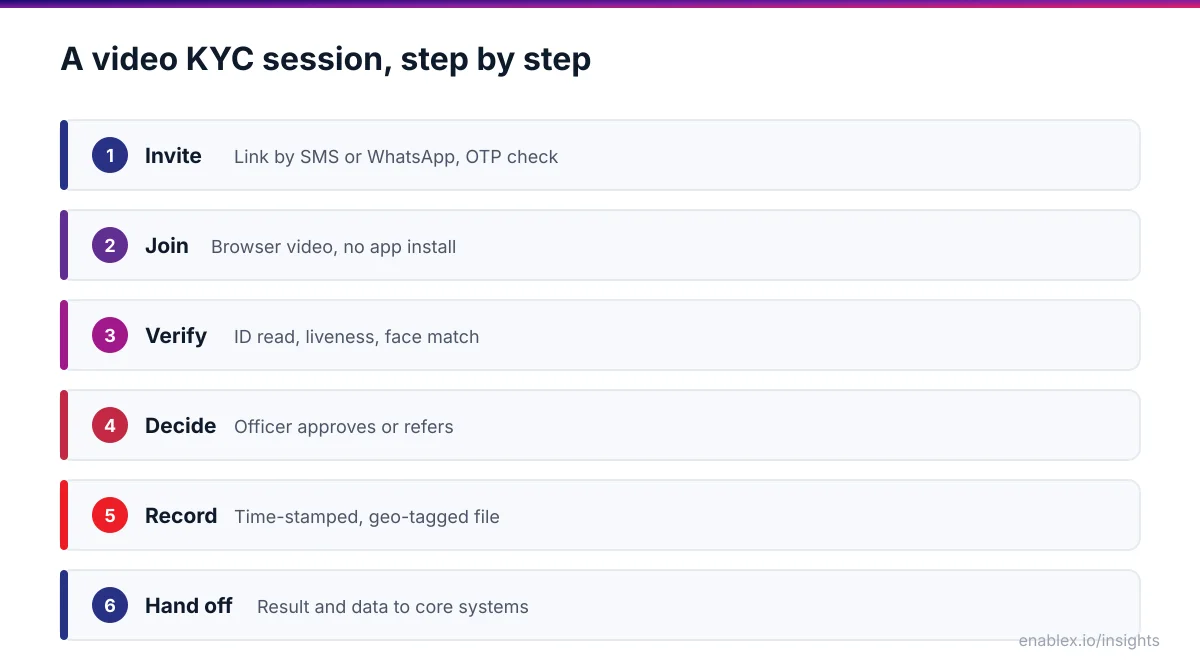
What the figure shows: A video KYC session, step by step: 1) Invite: link by SMS or WhatsApp, OTP check; 2) Join: browser video, no app install; 3) Verify: ID read, liveness, face match; 4) Decide: officer approves or refers; 5) Record: time-stamped, geo-tagged file; 6) Hand off: result and data to core systems.
- Invite. The customer starts KYC in your app or gets a link by SMS or WhatsApp. An OTP confirms the phone number.
- Join. The link opens a video call in the phone browser. No app download is needed, which matters on entry-level phones.
- Verify. The officer asks the customer to show their ID. Software reads the document (OCR), checks that a live person is present (liveness), and compares the face on camera with the photo on the ID (face match).
- Decide. The officer asks questions, checks the results and approves, rejects or refers the case.
- Record. The whole session is recorded with a time stamp and location, encrypted and stored with an audit trail.
- Hand off. The decision, extracted data, match score and recording link go to your core banking or policy system through an API.
What do regulators expect from video KYC?
Rules differ by country, but they tend to cover the same ground: who may run the call, how the customer is checked, how the session is recorded, and where the data lives.
India's Reserve Bank introduced its Video-based Customer Identification Process (V-CIP) in January 2020. It expects, among other things, a live session with an authorized official, geo-tagging, a live photo, liveness checks and secure, tamper-proof storage of the recording. Central banks and financial regulators in the Gulf and Southeast Asia have their own remote onboarding guidance, often with firm rules on where customer data is stored.
What makes video KYC succeed or fail?
Most video KYC programs that struggle do not fail on compliance. They fail on completion: customers start the check and drop out before the officer can finish.
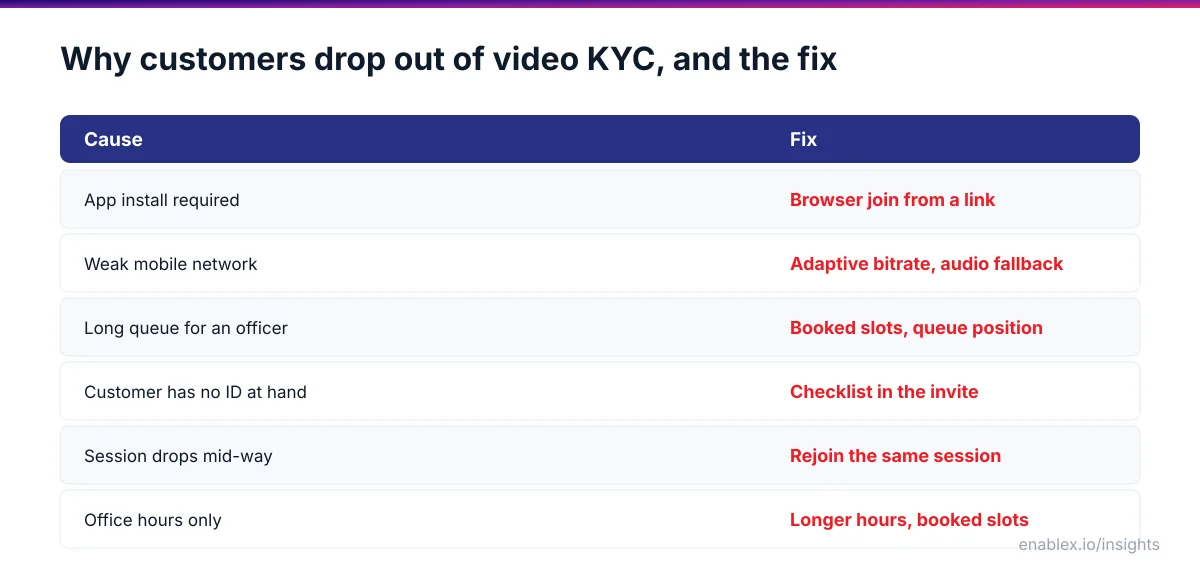
What the figure shows: Why customers drop out of video KYC, and the fix: App install required: browser join from a link; Weak mobile network: adaptive bitrate, audio fallback; Long queue for an officer: booked slots, queue position; Customer has no ID at hand: checklist in the invite; Session drops mid-way: rejoin the same session; Office hours only: longer hours, booked slots.
Two smaller things also matter. Send reminders on the channel the customer actually reads, often WhatsApp. And make the officer console fast: if officers wait on screens, customers wait on camera.
Who uses video KYC?
- Banks and lenders: savings accounts, loans, credit cards and re-KYC for existing customers.
- Insurers: policy issuance, claim verification and adding beneficiaries.
- Payment apps and wallets: upgrading users to full-KYC accounts.
- Brokers and fund houses: new investor accounts.
- Telcos: new connections where regulators require identity checks.
- Marketplaces: merchant and seller onboarding.
What technology sits behind a video KYC session?
A video KYC flow joins several parts that have to work together within a few minutes. If one is slow, the customer waits on camera.
Part | What it does |
|---|---|
Browser video (WebRTC) | Connects the customer and the officer with encrypted audio and video |
Officer console | Queue, customer details, AI results and decision buttons in one screen |
Liveness detection | Checks a real person is present, not a photo, screen replay or mask |
Document OCR | Reads name, number and dates from the ID shown on camera |
Face match | Compares the live face with the ID photo and returns a score |
Recording and storage | Encrypted, time-stamped, geo-tagged file with an audit trail |
Messaging and OTP | Invite, OTP, reminders and the result message to the customer |
Ask any vendor how these parts are connected. A single platform that covers video, AI checks, recording and messaging means fewer handoffs, fewer failure points and one place to look when something goes wrong.
How do you launch video KYC?
- Map the rule. Agree with compliance which regulation applies and what the session must capture.
- Design the flow. Decide the invite channel, the questions, the AI checks and what happens on a referral.
- Plan officer capacity for your peak hours, including campaign spikes.
- Pilot with one product and a small officer team, and watch completion by step.
- Scale once completion and handling time are stable.
How EnableX helps
EnableX Video KYC gives you the building blocks for a compliant flow: browser video with no app install, liveness detection, document OCR, face match, geo-tagging, encrypted recording and an audit trail, plus an officer console. Your compliance team designs the flow, and the same platform sends the invite and OTP by SMS or WhatsApp.
It runs in the EnableX cloud or fully on-premise for banks that need the whole stack behind their firewall. More than 200K video calls a month run on the EnableX Video API.
Planning video KYC? Try a test session or talk to our team about your flow.
Frequently asked questions
What is video KYC?
A remote identity check done on a live, recorded video call between a customer and an authorized officer, with software checking liveness, reading the ID and matching the face.
How long does video KYC take?
A standard session usually takes three to five minutes once the customer is connected to an officer.
Does the customer need an app for video KYC?
Not with a browser-based solution. The customer joins from a link on their phone.
Is video KYC accepted by regulators?
In many markets, yes. India's RBI allows it through V-CIP, and other regulators have their own remote onboarding rules. Check the rules in each country you operate in.
Can video KYC run on-premise?
Yes. Banks that must keep customer video inside their own network can run the video, AI and recording stack on-premise.
Founder and CEO, EnableX
Pankaj Gupta has spent 25+ years building IT and telecom businesses across Asia-Pacific and global markets. EnableX is his third company; the first two were built from zero and acquired by global companies. He also invests in B2B startups and mentors founders across the region.
Connect on LinkedIn →