On-Premise Video Calling: When Your Video Must Stay Behind Your Firewall

On-premise video calling means the whole video platform, including signaling, media servers, recordings and any AI, runs inside your own data center or private cloud. Customers still join from a browser or app, but no video, audio or recording passes through shared public infrastructure. Banks, insurers, healthcare providers and government bodies choose it when a regulator, contract or internal policy says customer video must stay under their control.
Key takeaways
- On-premise video runs the full stack (signaling, media, recording, AI) on infrastructure you control.
- It is driven by rules on data location, not by video quality.
- Hybrid setups keep media and recordings inside and use the cloud for the rest.
- The hard parts are network design, scaling for peaks, and upgrades without downtime.
- Ask vendors for production on-premise deployments, not a roadmap.
For most companies, the cloud is the right place for video. It is quick to start, it scales on demand, and someone else runs the servers. But for a bank verifying a new customer on camera, or a hospital recording a consultation, the question is not just "does the call work?" It is "where does this video live, and who can reach it?"
When the answer has to be "only inside our network", you need on-premise video calling. This guide explains what that means in practice, who needs it, and what to check before you commit.
What is on-premise video calling?
On-premise video calling is a video platform installed and run inside your own data center or private cloud tenancy. Your apps use the same APIs and SDKs as the cloud version, but every part of the call runs on servers you control.
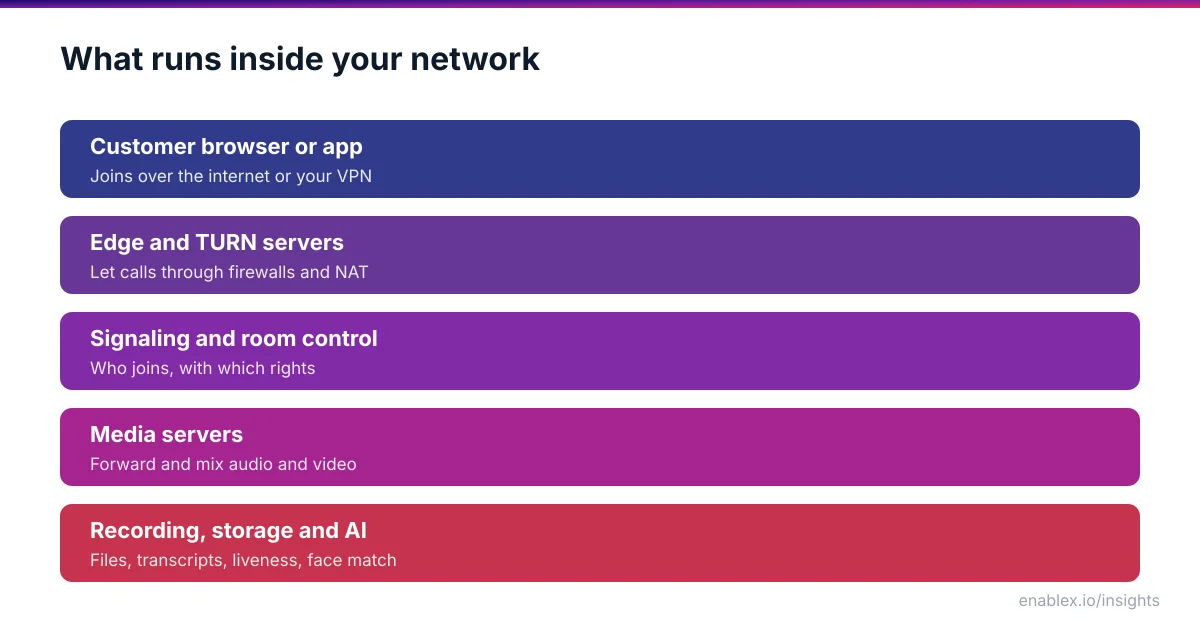
What the figure shows: What runs inside your network, from top to bottom: Customer browser or app (joins over the internet or your VPN); Edge and TURN servers (let calls through firewalls and NAT); Signaling and room control (who joins, with which rights); Media servers (forward and mix audio and video); Recording, storage and AI (files, transcripts, liveness, face match).
Two neighbors are worth knowing. Hybrid keeps the sensitive parts, usually media and recordings, inside your network, and uses the vendor cloud for things like analytics or management. Air-gapped removes the public internet link completely, which some government and defense networks require.
Who needs on-premise video?
The need comes from rules about where personal data can be stored and processed, and who can reach it. Video adds weight to this because a recording holds a face, a voice and often an identity document.
Sector | Typical driver | Common video use |
|---|---|---|
Banks and lenders | Central bank data and outsourcing rules | Video KYC, video banking, loan verification |
Insurance | Policyholder data and claims evidence | Claims inspection, policy verification |
Healthcare | Patient data protection laws | Consultations, second opinions |
Government | Data sovereignty, sometimes no internet link | Citizen services, court hearings |
Telcos and large enterprises | Security policy, integration with core systems | White-label video, internal use |
In India, for example, RBI rules for video-based customer identification (V-CIP) say the infrastructure must sit with the regulated entity, and recordings must be stored securely with an audit trail. Regulators in the Gulf and Southeast Asia have similar expectations on data location for banks. The details differ by country, so your compliance team should confirm which rule applies.
How does on-premise video differ from cloud video?
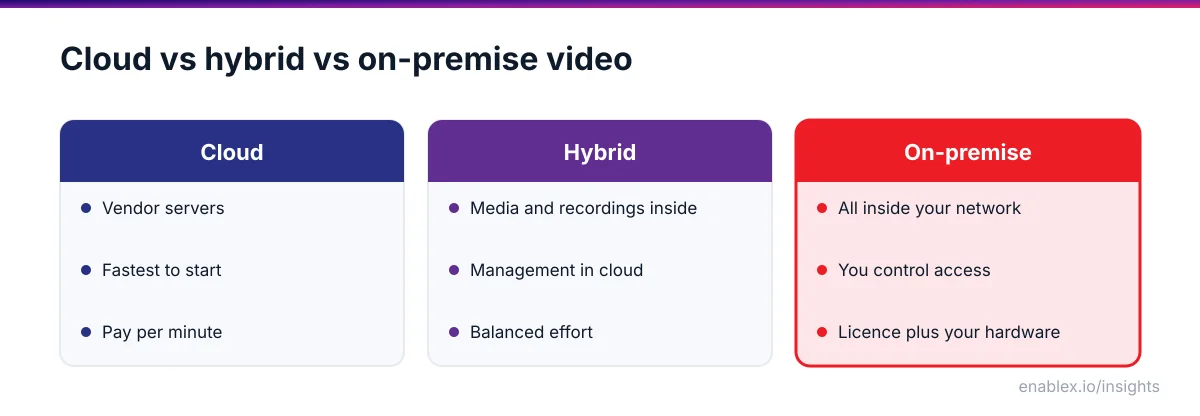
What the figure shows: Cloud vs hybrid vs on-premise video: Cloud (vendor servers, fastest to start, pay per minute); Hybrid (media and recordings inside, management in cloud, balanced effort); On-premise (all inside your network, you control access, licence plus your hardware).
The calling experience should be the same. What changes is who runs the servers, how you scale for peaks, and how upgrades reach you. In the cloud, the vendor adds capacity when traffic grows. On-premise, you plan capacity for your busiest hour and keep spare room for failover.
What does it take to run on-premise video?
- Network design. Customers join from the public internet, so you need edge and TURN servers in a DMZ, firewall rules for media ports, and a clear path to the media servers inside.
- Capacity planning. Size media servers for peak concurrent calls, recording load and any AI processing. Video KYC peaks, for example, often follow marketing campaigns.
- Storage and retention. Recordings grow fast. Plan storage, encryption at rest, retention periods and secure deletion to match your rules.
- High availability. At least two of everything that matters, across zones or sites, with tested failover.
- Upgrades and support. A clear process for patches and new versions, including how they reach an isolated network.
- Monitoring. Call quality, server load and failed joins, visible to your operations team.
What should you ask a vendor?
- Have you deployed fully on-premise in production, in my sector, and can I speak to that team?
- Which components run inside my network: signaling, media, TURN, recording, AI models?
- Is the API the same as your cloud API, so we can test in the cloud and move inside later?
- How do upgrades and security patches reach us, including in an isolated network?
- Can vendor staff reach production data? If yes, how is that controlled and logged?
- Does on-premise include messaging and voice too, or only video?
How EnableX helps
EnableX runs the full communication stack on-premise: video, voice, messaging and AI agents. For video, that covers signaling, media servers, TURN, server-side recording and AI such as liveness and face match, all inside your data center or private cloud. The APIs and SDKs are the same as the EnableX cloud, so teams often build and test in the cloud and then move to their own infrastructure.
Banks regulated by RBI, SAMA or MAS can deploy the entire video KYC stack behind their firewall. Hybrid and air-gapped setups are supported too. Read more in our On-Premise CPaaS guide.
Planning an on-premise rollout? Talk to an EnableX architect about your network, peak load and rules.
Frequently asked questions
What is on-premise video calling?
A video platform that runs inside your own data center or private cloud, so calls, recordings and AI processing stay on infrastructure you control.
Is on-premise video less reliable than cloud video?
Not if it is designed well. Reliability depends on capacity planning, redundancy and monitoring, which your team or the vendor sets up for your peak load.
Can customers join an on-premise video call from a browser?
Yes. Edge and TURN servers let customers join over the public internet from a browser or app, while media and recordings stay inside your network.
What is the difference between hybrid and on-premise video?
Hybrid keeps sensitive parts such as media and recordings inside your network and uses the vendor cloud for the rest. On-premise runs everything inside.
Who needs on-premise video?
Usually banks, insurers, healthcare providers, government bodies and telcos that must keep customer video and recordings under their own control.
Head - Engineering & AI, EnableX
Subrat Thayal is a founding member of EnableX and leads its engineering and AI. He has built the EnableX platform since the company started in 2017. He has worked alongside Pankaj Gupta for more than 20 years, and for the last few years has led the work to build AI into EnableX voice, messaging and video products.
Connect on LinkedIn →