Video Banking: How Banks Use Live Video Beyond Video KYC

Video banking lets customers speak face to face with a banker on a live video call from their phone or laptop. Banks use it for account opening and video KYC, loan and mortgage discussions, wealth and insurance advice, and complex service requests. It gives remote customers branch-quality advice, while recordings, consent and on-premise options keep it within banking rules.
Key takeaways
- Video banking goes beyond KYC: advice, sales and complex service all benefit.
- It extends specialist staff across many branches and regions.
- Recording, consent and audit trails matter for advice and sales.
- Messaging and voice around the call drive attendance and follow-up.
- Strictly regulated banks can run the whole stack on-premise.
Most banks first used video for one job: video KYC. That was the step regulators forced online. But the same video call can do much more. A mortgage expert can review documents with a customer in another city. A wealth advisor can meet a client after work without either of them traveling. A support specialist can solve a problem that would otherwise mean a branch visit.
This guide explains what video banking is, where it pays off beyond KYC, and what banks need to run it within the rules.
What is video banking?
Video banking is a live video conversation between a bank customer and a banker, run inside the bank's own app or website. It covers onboarding, advice, sales and service, with the same records and controls as a branch meeting.
Where does video banking pay off?
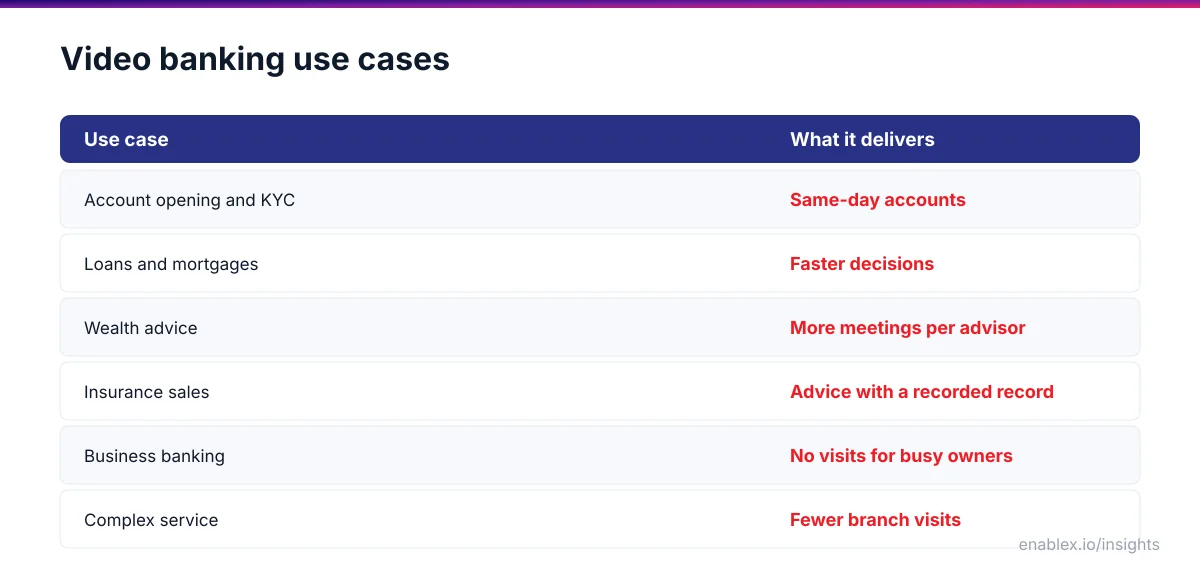
What the figure shows: Video banking use cases: Account opening and KYC: same-day accounts; Loans and mortgages: faster decisions; Wealth advice: more meetings per advisor; Insurance sales: advice with a recorded record; Business banking: no visits for busy owners; Complex service: fewer branch visits.
The pattern is the same in each case: a scarce specialist can serve many more customers when travel is taken out. One mortgage expert can cover several regions on video instead of one city in person.
What do banks need to get right?
Area | What to put in place |
|---|---|
Identity | Check the customer at the start of each call: login, OTP or a quick face match |
Consent and recording | Record advice and sales calls where rules require; tell the customer and log consent |
Data location | Media and recordings kept in-country or on-premise where regulators expect it |
Audit trail | Who joined, what was shared, what was agreed, all linked to the customer record |
Staff controls | Roles, supervised sessions and quality review of recordings |
Accessibility | Browser joining, weak-network support, and an audio fallback |
How does a video banking appointment work?
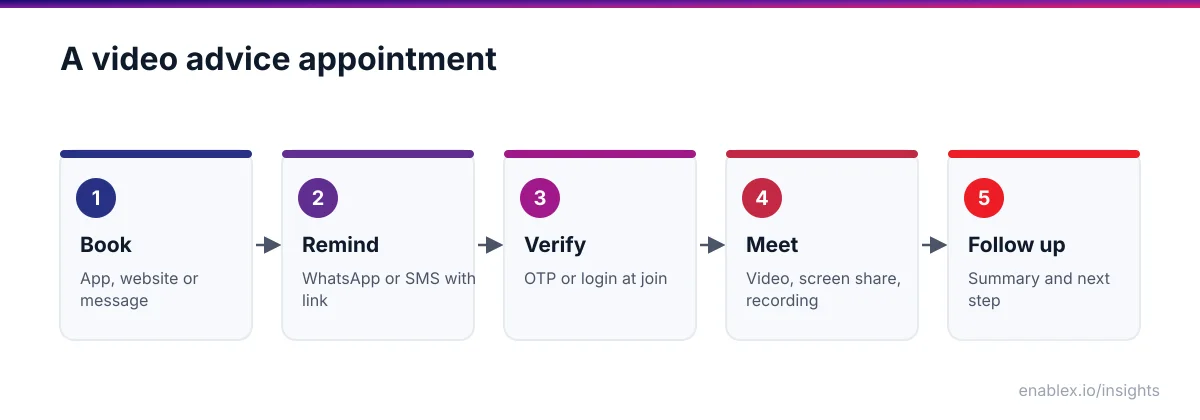
What the figure shows: A video advice appointment: 1) Book: app, website or message; 2) Remind: WhatsApp or SMS with link; 3) Verify: OTP or login at join; 4) Meet: video, screen share, recording; 5) Follow up: summary and next step.
- Let customers book a slot with the right specialist from the app, website or a message.
- Send a reminder with the join link on WhatsApp or SMS, and an OTP to confirm identity at join.
- During the call, the banker shares a screen to walk through rates, plans or documents.
- After the call, send a summary and the next step. Where e-signature is allowed, the customer can sign straight away.
What should banks measure?
- Appointments per specialist per week, compared with branch-only meetings.
- Conversion from video meetings for loans, insurance and investment products.
- Time from enquiry to decision for loans and mortgages.
- Branch visits avoided for service requests.
- Customer satisfaction after video sessions.
How does video compare with branch and phone banking?
Branch | Phone | Video | |
|---|---|---|---|
Face to face | Yes | No | Yes |
Customer travels | Yes | No | No |
Show documents and screens | Yes | No | Yes, screen share |
Identity assurance | High | Medium | High, with OTP or face match |
Specialist reach | One location | Any location | Any location |
Record of advice | Paper notes | Call recording | Video recording and notes |
Video does not replace branches or the phone. It fills the gap between them: conversations that need trust and visuals but not a physical visit.
How do banks roll out video banking?
- Start where video KYC already runs, reusing the same platform, rules and officer skills.
- Add one advice line, such as mortgages or wealth, with a small specialist team.
- Agree recording and consent rules with compliance for advice and sales calls.
- Promote it in the app and in messages to customers who start a product application.
- Measure and expand to other products and to business banking.
How EnableX helps
EnableX gives banks one platform for video banking: the Video API for advice and service calls with screen share and recording, Video KYC building blocks for onboarding, and SMS, WhatsApp and RCS for invites, OTPs and follow-ups. AI voice agents can confirm appointments and handle routine calls so bankers spend their time on advice.
Banks regulated by RBI, SAMA or MAS can deploy the video stack fully on-premise, with recordings kept inside their own data center. See On-Premise Video Calling for how that works.
Planning video banking? Talk to our team about your use cases and the rules you work under.
Frequently asked questions
What is video banking?
A live video conversation between a customer and a banker inside the bank's app or website, used for onboarding, advice, sales and service.
Is video banking only for KYC?
No. Banks also use it for loans and mortgages, wealth advice, insurance sales, business banking and complex service requests.
Is video banking secure?
It can be, with identity checks at the start of each call, encryption, recording with consent, audit trails and media kept in-country or on-premise.
Do customers need an app for video banking?
Not necessarily. Browser-based video lets customers join from a link, although many banks also add video to their own app.
Can video banking run on-premise?
Yes. Banks that must keep customer video inside their own network can run the video stack on-premise.
Founder and CEO, EnableX
Pankaj Gupta has spent 25+ years building IT and telecom businesses across Asia-Pacific and global markets. EnableX is his third company; the first two were built from zero and acquired by global companies. He also invests in B2B startups and mentors founders across the region.
Connect on LinkedIn →