Digital Customer Onboarding with Video: A Practical Playbook

Digital customer onboarding is the process of signing up, verifying and activating a new customer without a branch visit or paper. Live video helps at the steps where trust or explanation matters most, such as identity checks, high-value products and complex setups. The best flows mix self-service for simple steps, video for the hard ones, and messaging to bring people back when they stall.
Key takeaways
- Most onboarding is lost in the gaps between steps, not in the steps themselves.
- Use video where trust, identity or explanation matters; keep simple steps self-service.
- Messaging reminders on the right channel recover many stalled applications.
- Track drop-off by step, time to activation and cost per activated customer.
- One platform for video, OTP and messaging makes the flow easier to build and measure.
Every business that signs up customers online knows the pattern. Thousands start, far fewer finish. Some leave at the form, some at the document upload, some when they are asked to wait for a call that never comes. Each one cost money to attract.
Good digital onboarding closes those gaps. Live video is one of the strongest tools for it, but only when it is used at the right moments. This playbook explains where video fits, what to automate around it, and what to measure.
What is digital customer onboarding?
Digital customer onboarding is the full journey from "I want to sign up" to "I am an active customer", done online. It usually covers application, identity verification, agreement, account setup and the first use of the product.
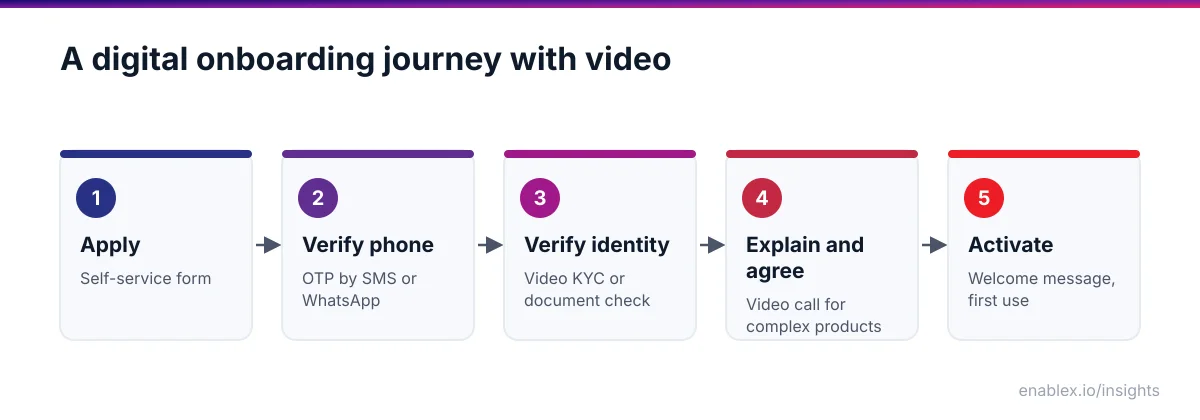
What the figure shows: A digital onboarding journey with video: 1) Apply: self-service form; 2) Verify phone: OTP by SMS or WhatsApp; 3) Verify identity: video KYC or document check; 4) Explain and agree: video call for complex products; 5) Activate: welcome message, first use.
Where does video help in onboarding?
Video earns its cost where a person needs to see someone, or be seen. Use it at those steps and keep everything else self-service.
Step | Use video when... | Keep self-service when... |
|---|---|---|
Identity check | Rules require a live check, or fraud risk is high | A database or document check is accepted |
Product explanation | The product is complex or high value (loans, insurance, wealth) | The product is simple and well known |
Setup | Setup is technical (business accounts, devices) | Setup takes a few taps |
Signing | A witness or officer must be present | An e-signature is enough |
First use | Customers often get stuck (B2B tools) | The first use is obvious |
The video call should open from a link with no app install, carry your branding and land its result straight in your systems. A customer who has to download an app to finish onboarding often does not.
How do you stop customers dropping out?
Most drop-off happens between steps: the customer is asked to wait, find a document or come back later, and never does. Three habits recover a large share of them.
- Remind on the channel they read. A WhatsApp or RCS message with a resume link usually gets more attention than an email. Fall back to SMS if it does not deliver.
- Let them book a time. Instead of a queue, offer a video slot that suits them, with a reminder before the call.
- Resume where they left off. Save progress so a customer who comes back starts at the step they stopped on, not at the beginning.
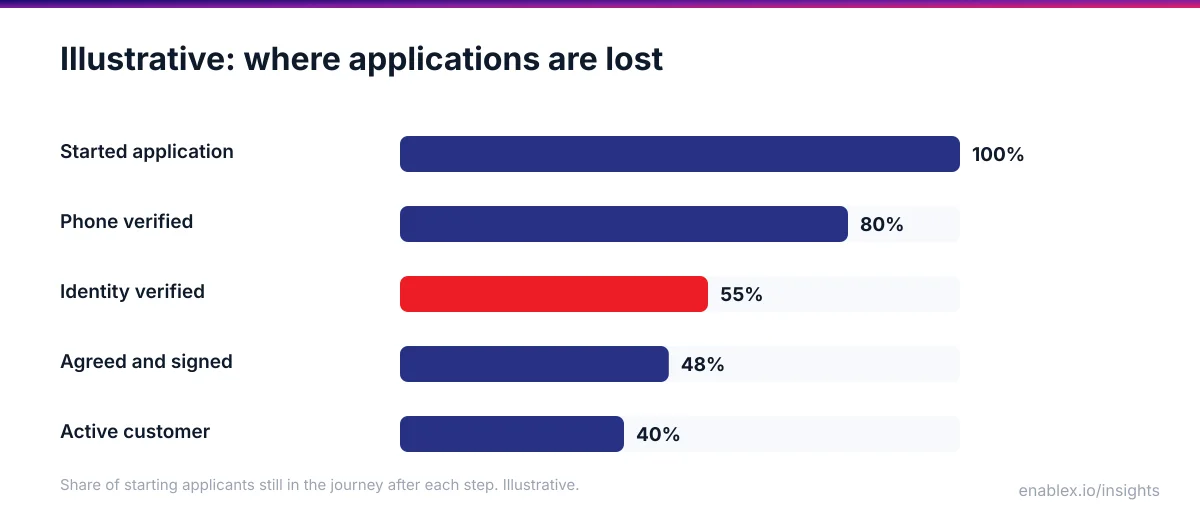
What the figure shows: Illustrative: where applications are lost: Started application (100%); Phone verified (80%); Identity verified (55%); Agreed and signed (48%); Active customer (40%). Share of starting applicants still in the journey after each step. Illustrative.
What should you measure?
- Drop-off by step: where people leave, so you fix the biggest gap first.
- Time to activation: from first click to first real use.
- Video connect rate: share of customers who reach an officer once they start a call.
- Average video handling time: the main driver of officer cost.
- Recovery rate: share of stalled applicants who come back after a reminder.
- Cost per activated customer: the number your finance team cares about.
Which industries use video onboarding?
Banks, lenders and insurers use it for identity checks and to explain products. Telcos use it for new connections where identity checks are required. Marketplaces and payment companies use it to onboard merchants. B2B software and service companies use guided video setup sessions so new customers reach first value faster.
Should you build onboarding video in-house or use an API?
Building real-time video from scratch means running media servers, handling firewalls and weak networks, and keeping up with browser changes. Few businesses gain anything from owning that work. A video API gives you the video, recording and events, while you keep control of the journey, the screens and the data.
Build in-house | Use a video API | |
|---|---|---|
Time to first live call | Months | Days |
Network and browser upkeep | Your team | The platform |
Recording and storage | Build and run yourself | Built in, delivered to your storage |
Control of the journey | Full | Full: your app, your screens |
Data location | Your choice | Cloud, in-region or on-premise |
What does a good onboarding video call look like?
- It opens from one tap, with the customer's name and the next step already on screen.
- The agent sees the application, so the customer never repeats information.
- It survives a weak signal by lowering video quality instead of dropping.
- It ends with a clear outcome and a message confirming what happens next.
How EnableX helps
EnableX puts the pieces of an onboarding flow on one platform: the Video API and Video KYC building blocks for live checks and guided calls, OTP and reminders over SMS, WhatsApp and RCS through the Unified Messaging API, and AI voice agents for follow-up calls. Events from each step come back to your systems, so you can see the whole funnel in one place.
EnableX handles 10M+ conversations a month across channels for customers in 20+ countries, with cloud and on-premise deployment.
Want to cut onboarding drop-off? Map your current journey with our team and see where video and messaging fit.
Frequently asked questions
What is digital customer onboarding?
The online journey from sign-up to an active customer, covering application, identity verification, agreement, setup and first use, without a branch visit or paper.
When should onboarding use a video call?
When a live identity check is required, when the product is complex or high value, or when setup is technical. Simple steps work better as self-service.
How do you reduce onboarding drop-off?
Send reminders on the channel customers read, let them book a video slot instead of queuing, and let them resume where they stopped.
What metrics matter in onboarding?
Drop-off by step, time to activation, video connect rate, video handling time, recovery rate and cost per activated customer.
Does video onboarding need an app?
No. A browser-based video call can open from a link sent by SMS or WhatsApp.
Founder and CEO, EnableX
Pankaj Gupta has spent 25+ years building IT and telecom businesses across Asia-Pacific and global markets. EnableX is his third company; the first two were built from zero and acquired by global companies. He also invests in B2B startups and mentors founders across the region.
Connect on LinkedIn →