Telehealth Video: What Providers Need Beyond the Video Call

A telehealth video service connects patients and clinicians on a secure live video call from a phone or browser. Beyond the call itself, it needs a waiting room, strong performance on weak networks, privacy controls, recording where consent allows, reminders that cut no-shows, and patient data kept in the right place. Providers usually build these into their own app with a video API.
Key takeaways
- The video call is the easy part; the patient journey around it decides success.
- Waiting rooms, reminders and simple joining cut no-shows.
- Patients join from homes and phones with weak networks, so quality must adapt.
- Privacy, consent and data location need answers before launch.
- Telehealth works best for follow-ups, triage, chronic care and mental health.
Telehealth grew fast when clinics had no other choice. Now patients and clinicians choose it when it is better: a five-minute follow-up that would otherwise take half a day, a specialist opinion from another city, a therapy session from home.
For providers building their own telehealth service, the video call itself is the easy part. This guide covers what else it takes to run telehealth that patients use and clinicians trust.
What is a telehealth video service?
A telehealth video service is a secure video consultation built into a provider's own app or patient portal. Patients book, join and pay in one place, and clinicians see the patient's record while they talk.
Which consultations suit video?
Works well on video | Usually needs a visit |
|---|---|
Follow-ups and results reviews | Physical examination |
Chronic care check-ins | Procedures and most tests |
Mental health and counseling | Emergencies |
Triage before a visit | Patients who cannot use a device without help |
Prescription renewals where allowed | Cases where the clinician asks to see the patient in person |
Second opinions and specialist advice |
What does a telehealth service need beyond video?
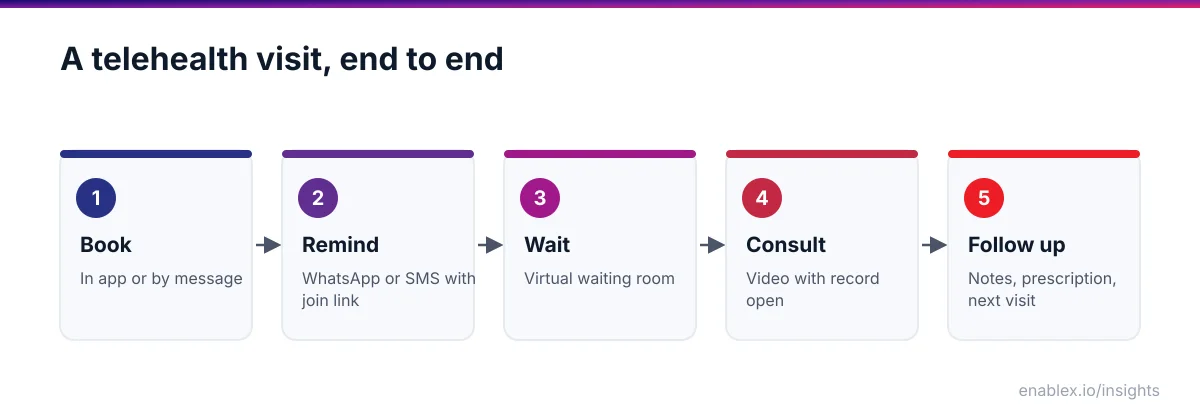
What the figure shows: A telehealth visit, end to end: 1) Book: in app or by message; 2) Remind: WhatsApp or SMS with join link; 3) Wait: virtual waiting room; 4) Consult: video with record open; 5) Follow up: notes, prescription, next visit.
- Simple joining. A link that opens in the phone browser. Many patients are older or not comfortable installing apps.
- A waiting room. Patients wait in a virtual lobby and the clinician admits them, just as in a clinic.
- Reminders. A message the day before and shortly before the visit, with the join link. Missed appointments are expensive.
- Weak-network performance. Video that lowers quality instead of freezing, and an audio-only fallback.
- Multi-party calls. A family member, an interpreter or a second clinician can join.
- Screen share. The clinician walks the patient through results or images.
- Recording with consent. Where rules and consent allow, recordings or transcripts help with notes and review.
How should telehealth handle privacy and data?
Health data is among the most protected categories of personal data. The rules differ by country and region, from general data protection laws to specific health records laws, but providers usually face the same questions.
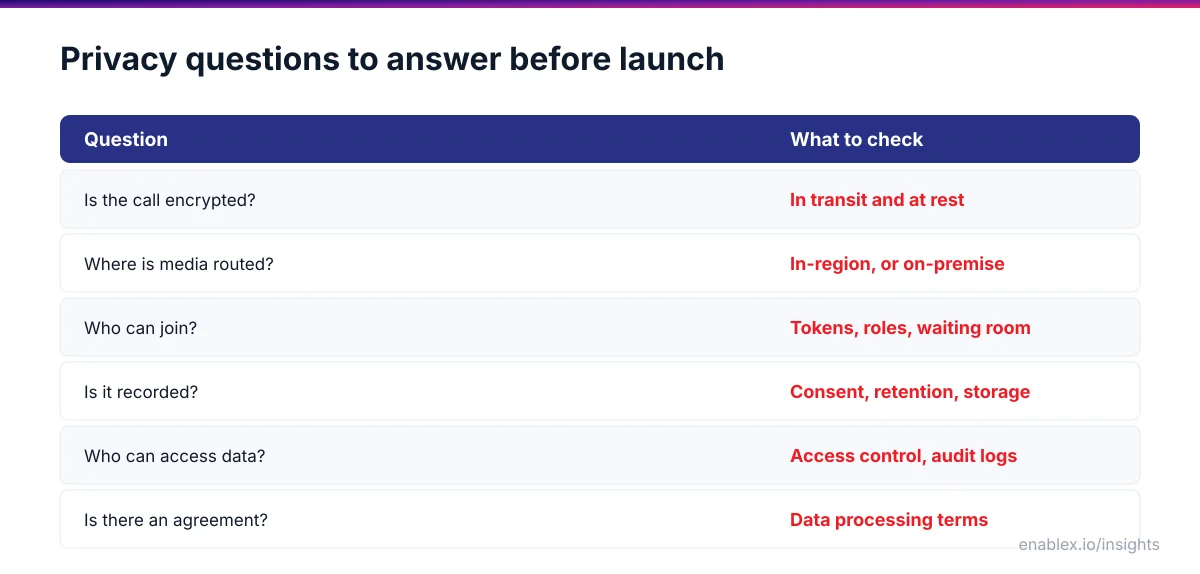
What the figure shows: Privacy questions to answer before launch: Is the call encrypted? in transit and at rest; Where is media routed? in-region, or on-premise; Who can join? tokens, roles, waiting room; Is it recorded? consent, retention, storage; Who can access data? access control, audit logs; Is there an agreement? data processing terms.
What should providers measure?
- No-show rate for video visits compared with clinic visits.
- Connection success: share of visits that connect on the first try.
- Visits moved to audio because of network problems.
- Clinician time per visit, including notes.
- Patient satisfaction after the visit.
How do you launch a telehealth service?
- Pick the visit types that suit video, such as follow-ups and results reviews, and agree them with clinicians.
- Settle privacy and data location with your compliance team before building.
- Build the journey, not just the call: booking, reminders, waiting room, notes and follow-up.
- Test on real patient devices and networks, including older phones and weak home Wi-Fi.
- Pilot with one department and track no-shows, connection success and clinician time.
- Expand to more specialties once the pilot numbers are stable.
Should you build on a video API or use an off-the-shelf tool?
Off-the-shelf telehealth tools are quick to start but keep patients in someone else's app, with limited control over the journey and the data. Building on a video API takes a few weeks longer, but the visit lives in your own app or portal, carries your brand, and connects to your scheduling and records systems. Providers that see telehealth as a lasting part of care usually choose the API route.
Off-the-shelf tool | Built on a video API | |
|---|---|---|
Time to start | Days | Weeks |
Patient experience | Vendor's app and branding | Your app, your brand |
Connection to records | Limited | Built to your systems |
Data location | Vendor's choice | In-region or on-premise |
How EnableX helps
The EnableX Video API gives providers patient-side mobile SDKs and browser joining, a waiting room through moderated entry, multi-party rooms, screen share and consultation recording, with media kept in-region or on-premise. Reminders and join links go out over WhatsApp, SMS and RCS from the same platform, and AI voice agents can confirm and reschedule appointments by phone.
Building or upgrading a telehealth service? Talk to our team about your patient journey and data rules.
Frequently asked questions
What is a telehealth video platform?
A secure video consultation service built into a provider's app or portal, with booking, joining, waiting room and follow-up in one place.
Do patients need an app for telehealth video?
Not necessarily. Browser-based video lets patients join from a link on their phone.
How do you reduce telehealth no-shows?
Send reminders with the join link on a channel patients read, such as WhatsApp or SMS, and make joining a single tap.
Is telehealth video secure?
It can be, with encryption in transit and at rest, role-based access, a waiting room, audit logs and media kept in-region or on-premise.
Which visits work well on video?
Follow-ups, chronic care check-ins, mental health, triage, results reviews and specialist opinions.
Founder and CEO, EnableX
Pankaj Gupta has spent 25+ years building IT and telecom businesses across Asia-Pacific and global markets. EnableX is his third company; the first two were built from zero and acquired by global companies. He also invests in B2B startups and mentors founders across the region.
Connect on LinkedIn →