Why Voice Agents Fail in Production (and What Actually Fixes Them)

Key takeaways
- Most production failures come from timing and plumbing rather than from the model.
- Budget latency hop by hop. The model is often not the slowest part.
- Test with real call audio: noise, accents, people talking over the agent.
- Never let the agent confirm an action before your system has confirmed it.
- Measure per-hop latency and outcomes on every call, from day one.
A voice agent demo is easy to love. It runs in a quiet room, with one speaker and a script everyone knows. Then the agent goes live and within a week someone forwards you a recording where the caller says "hello?" three times, the agent talks over them, and the call ends with a confused customer and a booking that never happened.
We have built and run voice agents on real phone lines for banks, insurers and service businesses. The same six failures come up again and again, and each one has a fix.
Why do voice agents feel slow, and how do you fix it?
People expect a reply within about a second of finishing their sentence. Past that, they start repeating themselves or assume the line has dropped. Every component adds delay, and the total is what the caller feels.
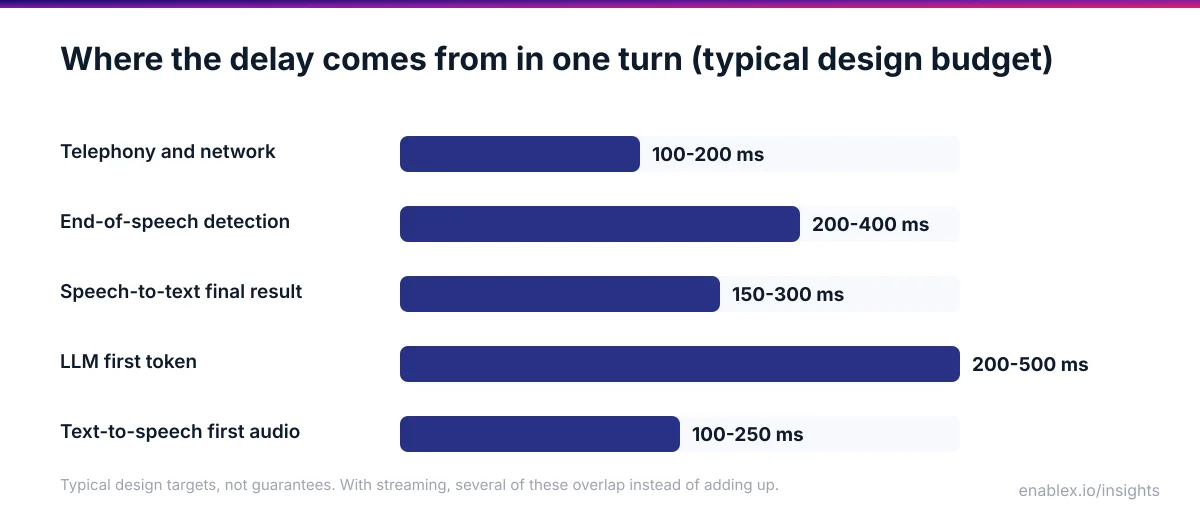
What the figure shows: Where the delay comes from in one turn: Telephony and network (100-200 ms); End-of-speech detection (200-400 ms); Speech-to-text final result (150-300 ms); LLM first token (200-500 ms); Text-to-speech first audio (100-250 ms). Typical design targets, not guarantees. With streaming, several of these overlap instead of adding up.
These changes make the biggest difference:
- Stream at every step: start the language model on partial transcripts, and start playing audio as soon as the first words are synthesized.
- Run media and AI close together, in the same region as the caller. Cross-continent hops add delay you can't recover in the model.
- Pre-render the phrases the agent says on every call, because cached audio starts almost immediately.
- Use a small, fast model for turns that do not need reasoning.
- Measure each hop separately. "The bot is slow" can't be debugged; "LLM first token p95 is 900 ms in this region" can.
Why do voice agents interrupt callers or leave long silences?
The agent either jumps in while the caller is pausing to think, or waits so long that the caller fills the silence. Simple silence timers cannot tell a thinking pause from the end of a sentence.
The fix is turn detection that looks at what was said as well as at the silence. "My account number is..." is clearly unfinished, whatever the pause. Tune the thresholds per use case: collections calls and appointment booking have different rhythms.
How should a voice agent handle interruptions and background noise?
It should stop talking quickly when the caller really speaks, and ignore horns, traffic and other background sound. That takes fast barge-in, noise suppression and a minimum speech length before treating sound as an interruption.
Callers interrupt, and they call from cars, markets and shop floors. An agent that keeps talking when the caller cuts in feels rude. An agent that stops every time a horn sounds feels broken.
The answer is barge-in that stops playback within a few hundred milliseconds when real speech starts, plus noise suppression and a minimum speech length before the agent treats sound as an interruption. Test both directions with real background audio.
Why do voice agents mishear names, numbers and amounts?
Phone audio is narrowband, and the sounds that separate "fifteen" from "fifty" or "F" from "S" are exactly the ones it loses. Misheard policy numbers, dates and amounts are behind a large share of failed transactions.
- Use speech models tuned for telephone audio and for the caller's language.
- Give the recognizer hints: expected formats, product names, the customer's own name from your CRM.
- Read critical values back and ask for confirmation, keeping the read-back short.
- Offer keypad entry as a fallback for long numbers.
How do you stop a voice agent confirming actions that didn't happen?
Only let the agent confirm an action after your system returns success. Put a time limit on every tool call, fill the wait naturally, and offer a person if the call fails.
The agent says "your payment is scheduled" while the API call is still running, or after it has failed. This is the most damaging failure, because the customer believes it.
One rule prevents this: the agent may only confirm an action after your system returns success. Put a time limit on every tool call and give the agent a natural line to fill the wait ("one moment while I check that"). If the call fails, say so and offer a human.
How do you hand a call to a person without losing the customer?
Set the handover rules first, route the call to the right team, and pass a summary to the human agent before they pick up. That way the customer doesn't have to start again.
The agent decides to transfer, the call drops into a general queue, and the human asks the customer to start again. The automation saved nothing and the customer is now angrier.
To fix it, decide the handoff rules first (anger, repeated failure, high-value requests, regulatory triggers), route to the right team, and pass a summary to the human agent before they pick up.
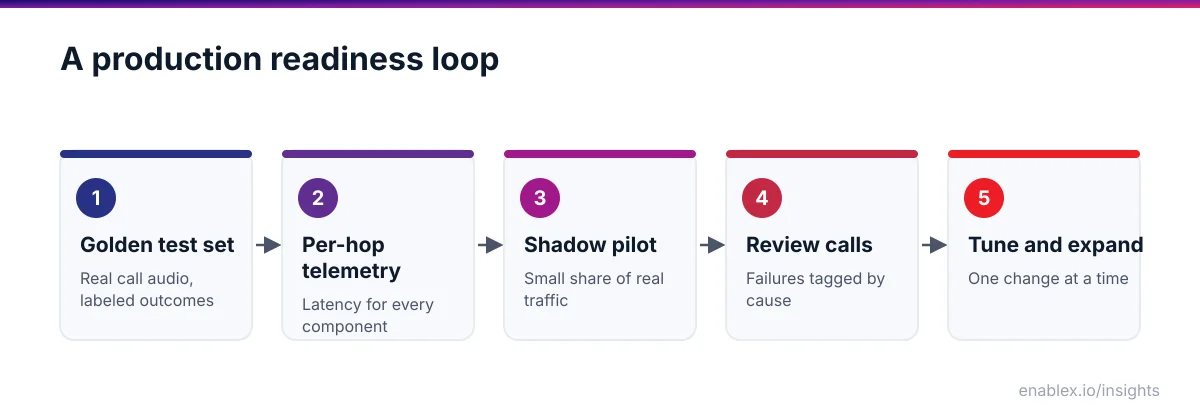
What the figure shows: A production readiness loop: 1) Golden test set: real call audio, labeled outcomes; 2) Per-hop telemetry: latency for every component; 3) Shadow pilot: small share of real traffic; 4) Review calls: failures tagged by cause; 5) Tune and expand: one change at a time.
How should you test a voice agent before going live?
Build a test set from realistic call audio, run it after every change, and record per-hop latency on every call. Then pilot on a small share of real traffic with people reviewing a sample of calls.
- Build a golden test set from real or realistic call audio: accents, noise, interruptions, wrong numbers, angry callers. Label the expected outcome of each.
- Simulate at scale: run the test set through the agent after every change, and use automated callers to test concurrency.
- Instrument every hop so each call records its latency breakdown and its outcome.
- Pilot on a small share of real traffic with humans reviewing a sample of calls daily.
- Change one thing at a time and re-run the test set before each release.
How does EnableX help voice agents work in production?
At EnableX, telephony, media and the AI pipeline run on one platform, so we can measure and tune the whole path of a call instead of tuning the model in isolation. We keep a labeled test set and per-hop latency telemetry for our voice agents, pre-render common phrases for high-volume calls, and include live handover with a call summary in every Voice AI package. Agents can run hosted, in a private cloud or on-premise, close to where your callers are. EnableX handles 10M+ conversations a month for customers in 20+ countries.
Hear live agents on our demo page, or book a session with our engineering team to review your voice agent design.
Frequently asked questions
What latency is acceptable for a voice agent?
Callers expect a reply within about one second of finishing their sentence. Aim for well under that at the median and keep the slowest calls close to it. Measure each component separately to find where the time goes.
Why do voice agents work in demos but fail on real calls?
Demos run in quiet rooms with cooperative speakers. Real calls bring noise, accents, interruptions, narrowband phone audio and slow backend systems. Most production failures come down to timing and integration rather than model quality.
What is barge-in?
Barge-in is the ability of a voice agent to stop speaking as soon as the caller starts talking, so the caller can interrupt naturally.
How do you test a voice agent before launch?
Use a labeled set of realistic call recordings, run automated test calls after every change, record per-hop latency on every call, and pilot on a small share of real traffic with human review.
Head - Engineering & AI, EnableX
Subrat Thayal is a founding member of EnableX and leads its engineering and AI. He has built the EnableX platform since the company started in 2017. He has worked alongside Pankaj Gupta for more than 20 years, and for the last few years has led the work to build AI into EnableX voice, messaging and video products.
Connect on LinkedIn →